Hoe werkt Print-rotatie?
Bij dubbelzijdige, aan de bovenkant gebonden Wire-o (ringband) brochures kun je, wanneer je de brochure voor je openslaat, de 'leesrichting' van de bovenste pagina kiezen. Dit wordt bepaald door de mogelijke rotatie met 180° van de tekst op de even pagina's.
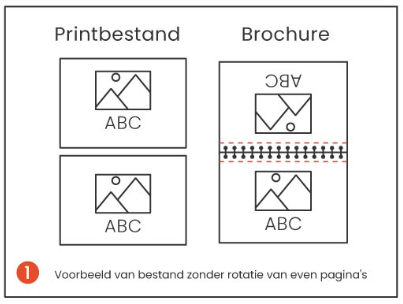
Geen Print-rotatie
In voorbeeld '1 - Voorbeeld van bestand zonder rotatie van even pagina's', zie je hoe de Wire-o-brochure eruit zou zien als je geen van de pagina's zou draaien/roteren.
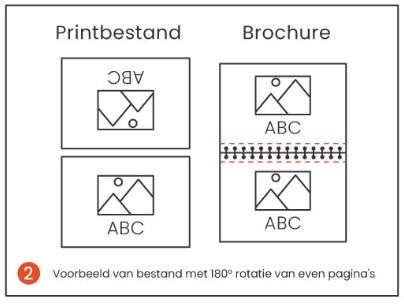
Met Print-rotatie
In voorbeeld '2 - Voorbeeld van bestand met 180° rotatie van even pagina's', zie je hoe de Wire-o brochure eruit zou zien als je de afdrukken op alle even pagina's 180° zou draaien/roteren (behalve de laatste pagina, want dat is de achterkant).
Zie verder de 'Wire-o Brochures Print-File Info-Sheet' bijgevoegd bij de Werktekeningen, voor meer uitleg rond dit onderwerp.